Visualizzazione post con etichetta mp3player. Mostra tutti i post

giovedì 24 luglio 2014

Creating the frequencies spectrum frame


Following what we did for the waveform, we are gonna create a panel that shows the frequencies spectrum of the current song signal. The process is the same, the idea is that each time the pcmdata is sent to the frame the signal is processed using an implementation of the fast fourier trasnform and then updated on screen. Here is what are we gonna do:

  • create a N_TASK of tasks to work on a portion of the signal
  • each task uses FFT on part of the pcmdata and calculate the frequencies
  • the last task doing the job merges all the results together making the avg of each result provided from the tasks for each frequency.
  • in the end we call repaint() to update the panel.


  1
  2
  3
  4
  5
  6
  7
  8
  9
 10
 11
 12
 13
 14
 15
 16
 17
 18
 19
 20
 21
 22
 23
 24
 25
 26
 27
 28
 29
 30
 31
 32
 33
 34
 35
 36
 37
 38
 39
 40
 41
 42
 43
 44
 45
 46
 47
 48
 49
 50
 51
 52
 53
 54
 55
 56
 57
 58
 59
 60
 61
 62
 63
 64
 65
 66
 67
 68
 69
 70
 71
 72
 73
 74
 75
 76
 77
 78
 79
 80
 81
 82
 83
 84
 85
 86
 87
 88
 89
 90
 91
 92
 93
 94
 95
 96
 97
 98
 99
100
101
102
103
104
105
106
107
108
109
110
111
112
113
114
115
116
117
118
119
120
121
122
123
124
125
126
127
128
129
130
131
132
133
134
135
136
137
138
139
140
141
142
143
144
145
146
147
148
149
150
151
152
153
154
155
156
157
158
159
160
161
162
163
164
165
166
167
168
169
170
171
172
173
174
175
176
177
178
179
180
181
182
183
184
185
186
187
188
189
190
191
192
193
194
195
196
197
198
199
200
201
202
203
204
205
206
207
208
209
210
211
212
213
214
215
216
217
218
219
220
221
222
223
224
225
226
227
228
229
230
231
232
233
234
235
236
237
238
239
240
241
242
243
244
245
246
247
248
249
250
251
252
253
254
255
256
257
258
259
260
261
262
263
264
265
266
267
268
269
270
271
272
273
274
275
276
277
278
279
280
281
282
283
284
285
286
287
288
289
290
291
292
293
294
295
296
297
298
299
300
301
302
303
package it.pievis.GUI;

import gov.nasa.jpf.jvm.Verify;
import it.pievis.utils.BackgroundExecutor;
import it.pievis.utils.BarrierMonitorLock;
import it.pievis.utils.Timer;
import it.pievis.utils.Utils;

import java.awt.Color;
import java.awt.Dimension;
import java.awt.Graphics;
import java.awt.Graphics2D;
import java.awt.Label;
import java.awt.Point;
import java.awt.Rectangle;
import java.awt.RenderingHints;
import java.awt.geom.Rectangle2D;

import javax.swing.ImageIcon;
import javax.swing.JFrame;
import javax.swing.JPanel;

import it.pievis.utils.Complex;

public class FFTParallelFrame extends JFrame {
 
 private int N_TASK = 2;
 private int pcmLenght = 0;
 private int pow2FreqLenght; //max power of 2 we can select
 private boolean canWriteOnScreen = false;
 private boolean updatedOnScreen = true;

 private int WIDTH = 450;
 private int HEIGHT = 100;
 private FreqDiagPanel fdp;
 private Rectangle2D[] recs;
 private Complex[][] frequencies; //Frequencies calculated for every task at a given time
 
 private int taskCount = 0; //Necessary for ugly way to coordinate tasks over frequencies
 
 //Icons
 ImageIcon frameIcon = new ImageIcon(getClass().getResource("/res/waveicon.png"));
 
 //
 Timer timer = new Timer(); //timer for max/min drawtime
 
 public FFTParallelFrame() {
  super();
  setIconImage(frameIcon.getImage());
  setSize(WIDTH, HEIGHT+20); //+20 is the title gap
  setTitle("Frequency Diagram Frame");
  setName("Main FRAME");
  fdp = new FreqDiagPanel();
  fdp.setSize(WIDTH, HEIGHT);
  fdp.setName("FreqDiag PANEL");
  add(fdp);
 }
 
 public void updateWave(byte[] pcmdata)
 {
  fdp.updateWave(pcmdata);
 }
 
 /**
  * JPanel that contains the frequency spectrum
  * every frequency is drawn on screen as a rectangle
  * every times a new pcmdata is received, N_TASK tasks process a portion of the signal (that is pcmdata)
  * @author Pierluigi
  */
 class FreqDiagPanel extends JPanel
 {
  byte[] pcmdata = null;
  Label cdtlmx; //Label per il drawtime massimo
  Label cdtlmn; //Label per il drawtime minimo
  Label cdtlavg; //Label per il drawtime medio
  
  public FreqDiagPanel()
  {
   super();
   ///
   frequencies = new Complex[N_TASK][]; //Instantiate first array
   initAmbient(); //Instantiate the arrays
   
   //Label for drawing time
   setLayout(null);
   cdtlmx = new Label("DrawTime max");
   cdtlmx.setBounds(0, 0, 80, 10);
   add(cdtlmx);
   cdtlmn = new Label("DrawTime min");
   cdtlmn.setBounds(0, 10, 80, 10);
   add(cdtlmn);
   cdtlavg = new Label("DrawTime avg");
   cdtlavg.setBounds(160, 0, 80, 10);
   add(cdtlavg);
  }
  
  /**
   * Refresh the wave every times a new pcmdata arrives
   */
  public void updateWave(byte[] pcmdata)
  {
   //log("pcmdata received");
   synchronized (fdp) {
    if(!updatedOnScreen) //scarta tutti i pcm che non posso disegnare
     return;
    updatedOnScreen = false;
   }
   this.pcmdata = pcmdata;
   callTask();
  }
  
  /**
   * Calls all the task with the canon executor
   */
  private void callTask()
  {
   timer.start();
   if(pcmdata.length == 0){
    //May happen when we seek
    updatedOnScreen = true;
    return;
   }
   
   //Instantiate arrays every time pcmdata change length
   if(pcmdata.length != pcmLenght)
   {
    initAmbient(); //Reinstantiate the arrays
   }
   int HEIGHT = getHeight();
   int WIDTH = getWidth();
   
   //Let more tasks do the math
   for(int i=0; i<N_TASK; i++)
    BackgroundExecutor.get().execute(new FftTask(WIDTH, HEIGHT, i));
  }
  
  /**
   * Handle the refresh of the diagram
   * @param g
   */
  private void doDrawing(Graphics g){
   
   Graphics2D g2d = (Graphics2D) g;
   g2d.setRenderingHint(RenderingHints.KEY_ANTIALIASING, RenderingHints.VALUE_ANTIALIAS_OFF);
   
   if(pcmdata == null || pcmdata.length == 0){
          //Render something
    Rectangle rect0 = new Rectangle(new Point(10,10), new Dimension(WIDTH-20, HEIGHT-20));
    g2d.draw(rect0);
    g2d.fill(rect0);
    return;
         }
   //Let swing handle the drawing
   drawRects(g2d);
  }
  
  /**
   * Splitted computation for each part of the signal
   * Each task calculate the frequencies using a different part of the signal
   * One task do the math for the rectangles positions and lengths
   * @author Pierluigi
   */
  class FftTask implements Runnable
  {
   Graphics2D g2d;
   int HEIGHT;
   int WIDTH;
   int N;
   
   public FftTask(int width, int height, int n) {
    HEIGHT = height;
    WIDTH = width;
    N = n; //to identify wich part of the pcmdata it should process
   }
   
   @Override
   public void run() {
    calcFrequency(); //set freqencies[N] with the result of the fft
    synchronized (FFTParallelFrame.this) {
     //Verify.beginAtomic();
     taskCount++;
     //Only one will calculate the rectangle position relative to the frequencies
     if(taskCount == N_TASK){
      taskCount = 0;
      calcRects();
      canWriteOnScreen = true;
      repaint();
     }
     //Verify.endAtomic();
    }
   }
   
   /**
    * Calculates frequencies[N] using fft on part of the signal
    */
   private void calcFrequency(){
    //int windowSize = pcmdata.length / N_TASK;
    int windowSize = pow2FreqLenght;
    int winSizeHalf = windowSize/2;
    int from = (windowSize) * N;
    int to = windowSize * (N+1);
    Complex[] data = new Complex[winSizeHalf]; //2channel to 1 wave rappresentation for the task
    int j = 0;
    for(int i = from; i<to; i+=2){
     data[j] = new Complex(Utils.getSixteenBitSample(pcmdata[i+1], pcmdata[i]),0);
     j++;
    }
    Complex[] freqs = Utils.fft(data);
    frequencies[N] = freqs;
   }
    
   /**
    * Calculate positions of the rectangles on screen
    */
   private void calcRects()
   {
    //log("CalcRects called " + Thread.currentThread().getName());
    int nRects = frequencies[0].length/2; //Number of data (rectangles) on screen, only half of the fft returned frequencies are useful
    //log("STAMPA: " + nRects  + "  " + frequencies[0][0]);
    float recWidth = (float) WIDTH/nRects;
    float scale = (float) HEIGHT/1000000;
    for(int i = 0; i<nRects; i++)
    {
     double value = 0;
     for(int j = 0; j < N_TASK; j++)
     {
      assert (frequencies[j][i] != null);
      if(frequencies[j][i] != null)
       value += frequencies[j][i].abs(); //take the value from every vector frequency
       //(calculated from different part of the wave by the tasks)
     }
     value = (value / N_TASK) * scale; //avarege value between calcs, scaled & inverted
     float posx = recWidth * i;
     Rectangle2D r = new Rectangle();
     r.setRect(posx, HEIGHT-value, recWidth, value);
     recs[i] = r; //
    }
   }
  }
  
  /**
   * This should draw rectangles stored in recs
   * @param g2d
   */
  void drawRects(Graphics2D g2d)
  {
   assert(recs != null);
   if(canWriteOnScreen){ //repaint() might be called by something else
    for(int i = 0; i<recs.length; i++)
    {
     g2d.draw(recs[i]);
     g2d.fill(recs[i]);
     if(i%2==0)
      g2d.setColor(Color.darkGray);
     else
      g2d.setColor(Color.lightGray);
    }
    g2d.dispose();
    timer.stop(); //stop the timer for the draw time
    synchronized (fdp) {
     canWriteOnScreen = false;
     updatedOnScreen = true;
    }
   }
  }
  
  /**
   * Called each time the UI is rendered
   */
  @Override
  protected void paintComponent(Graphics g) {
   super.paintComponent(g);
   doDrawing(g);
   cdtlmx.setText(timer.getMax() + "");
   cdtlmn.setText(timer.getMin() + "");
   cdtlavg.setText(timer.getAvg() + "");
  }
  
  /**
   * Instantiate all the needs of the panel, like the arrays
   */
  private void initAmbient(){
   if(pcmdata != null)
    pcmLenght = pcmdata.length;
   else
    pcmLenght = 4608;
   int freqLenght = (pcmLenght/N_TASK)/2;
   int log2 = Utils.log(freqLenght, 2);
   pow2FreqLenght = (int) Math.pow(2, log2);
   log("Total rectangles/frequencies to draw: " + pow2FreqLenght +"/2");
   for(int i = 0; i<N_TASK; i++)
    frequencies[i] = new Complex[pow2FreqLenght];
   recs = new Rectangle2D[pow2FreqLenght/4]; //we use 16bit data and only half of the fft freqencies are useful
   canWriteOnScreen = false; //don't write until we have recalculated the frequencies
  }
 }
 /// END OF JPANEL CLASS
 
 private void log(String line)
 {
  System.out.println("FD out] " + line);
 }
}

Creating the waveform frame

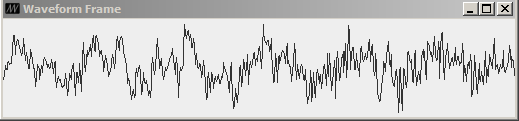
What we are trying to accomplish here is to create a simple and yet smooth waveform visualizer for the song we play with our basic player extension (the AudioPlayer class we made earlier), but that can really work for every discrete signal in input. The basic idea is that the frame is updated each time a new array of bytes (pcmdata, the signal) is processed and send using a function we'll call updateWave(). What are we gonna do is:

  • Get the current signal, taking the pcmdata in input
  • Create a N_TASK of tasks to work outside the swing thread
  • Each task will make the math and calculate the position of screen of the polyline for a part of the signal
  • Once all the signal is calculated we call repaint() to make awt update the panel.
What are we doing in theory is called result parallelism, we'll crate more task that works in parallel (sorta, depends by the number of processors of the machine) to solve our problem. We'll have to coordinate the task by using a taskCount variable and a synchronized block (we don't want lost updates), when taskCount reach N_TASK, we know we have to call repaint(). Now, let's see the code.


  1
  2
  3
  4
  5
  6
  7
  8
  9
 10
 11
 12
 13
 14
 15
 16
 17
 18
 19
 20
 21
 22
 23
 24
 25
 26
 27
 28
 29
 30
 31
 32
 33
 34
 35
 36
 37
 38
 39
 40
 41
 42
 43
 44
 45
 46
 47
 48
 49
 50
 51
 52
 53
 54
 55
 56
 57
 58
 59
 60
 61
 62
 63
 64
 65
 66
 67
 68
 69
 70
 71
 72
 73
 74
 75
 76
 77
 78
 79
 80
 81
 82
 83
 84
 85
 86
 87
 88
 89
 90
 91
 92
 93
 94
 95
 96
 97
 98
 99
100
101
102
103
104
105
106
107
108
109
110
111
112
113
114
115
116
117
118
119
120
121
122
123
124
125
126
127
128
129
130
131
132
133
134
135
136
137
138
139
140
141
142
143
144
145
146
147
148
149
150
151
152
153
154
155
156
157
158
159
160
161
162
163
164
165
166
167
168
169
170
171
172
173
174
175
176
177
178
179
180
181
182
183
184
185
186
187
188
189
190
191
192
193
194
195
196
197
198
199
200
201
202
203
204
205
206
207
208
209
210
211
212
213
214
215
216
217
218
219
220
221
222
223
224
225
226
227
228
229
230
231
232
233
234
235
236
237
238
239
240
241
242
243
244
245
246
247
248
249
250
251
252
253
254
255
256
257
258
259
260
261
262
263
264
265
266
package it.pievis.GUI;

import it.pievis.utils.BackgroundExecutor;
import it.pievis.utils.BarrierMonitorLock;
import it.pievis.utils.Timer;
import it.pievis.utils.Utils;

import java.awt.Graphics;
import java.awt.Graphics2D;
import java.awt.Label;
import java.awt.RenderingHints;
import java.util.concurrent.Executor;

import javax.swing.ImageIcon;
import javax.swing.JFrame;
import javax.swing.JPanel;

public class WaveformParallelFrame extends JFrame {

 private int WIDTH = 450;
 private int HEIGHT = 100;
 private int N_TASK = 2;
 private int NTOTLINES = 0;
 private int DISCARD_FACTOR = 4; //must be %2=0 ( < 8 )
 private WaveformPanel wfp;
 private int[] polyliney, polylinex; //contains positions for the polyline
 
 //Executor/Other
 Executor executor = BackgroundExecutor.get();
 boolean updatedOnScreen = true;
 private boolean canWriteOnScreen = false;
 
 //Icons
 ImageIcon frameIcon = new ImageIcon(getClass().getResource("/res/waveicon.png"));
 
 //Check correctness/performance
 int taskCount = 0;
 Timer timer = new Timer(); //timer for max/min drawtime
 
 public WaveformParallelFrame() {
  super();
  setIconImage(frameIcon.getImage());
  setSize(WIDTH, HEIGHT+20);
  setTitle("Waveform Frame");
  setName("Main FRAME");
  wfp = new WaveformPanel();
  wfp.setSize(WIDTH, HEIGHT);
  wfp.setName("Waveform PANEL");
  //wfp.setDoubleBuffered(false);
  add(wfp);
 }
 
 public void updateWave(byte[] pcmdata)
 {
  wfp.updateWave(pcmdata);
 }
 
 /**
  * This panel gets a signal with updateWave and each time
  * he can (not busy), he asks the executor to run
  * N_TASK tasks that calculate the absolute position of the
  * polyline relative to part of the signal (that is pcmdata)
  * @author Pierluigi
  */
 class WaveformPanel extends JPanel
 {
  byte[] pcmdata = null;
  Label cdtlmx; //Label per il drawtime massimo
  Label cdtlmn; //Label per il drawtime minimo
  Label cdtlavg; //Label per il drawtime medio

  public WaveformPanel()
  {
   super();
   setLayout(null);
   cdtlmx = new Label("DrawTime max");
   cdtlmx.setBounds(0, 0, 80, 10);
   add(cdtlmx);
   cdtlmn = new Label("DrawTime min");
   cdtlmn.setBounds(0, 10, 80, 10);
   add(cdtlmn);
   cdtlavg = new Label("DrawTime avg");
   cdtlavg.setBounds(160, 0, 80, 10);
   add(cdtlavg);
  }
  
  /**
   * Refresh the wave every times a new pcmdata arrives
   */
  public void updateWave(byte[] pcmdata)
  {
   //ignore all other pcmdata until we draw something
   //repaint();
   synchronized (wfp) {
    if(!updatedOnScreen)
     return;
    updatedOnScreen = false;
   }
   this.pcmdata = pcmdata;
   callTask();
  }
  
  /**
   * This makes the executor run some task
   * each task calculate position for part of the signal
   */
  private void callTask()
  {
   timer.start();
   int numLines = pcmdata.length/4; // half because 2 points = 1 line, other half because we use 16 bit samples
   numLines/=DISCARD_FACTOR; //Discard other lines for performance (no quality but speed).
   
   //Instantiate the array if the number of total lines changes
   //This might happen due to different pcm lenght from song to song
   if(NTOTLINES != numLines){
    NTOTLINES = numLines;
    instantiateEmptyLinesArray();
    log("Lines we are drawing: " + numLines );
   }
   //Let multiple task do the math
   int diff = pcmdata.length / N_TASK;
   for(int i = 0; i<N_TASK; i++)
    executor.execute(new WaveformTask(getWidth(), getHeight(), i*diff, (i+1)*diff, i));
  }
  
  /**
   * Handle the refresh of the waveform
   * @param g
   */
  private void doDrawing(Graphics g){
   Graphics2D g2d = (Graphics2D) g;
   g2d.setRenderingHint(RenderingHints.KEY_ANTIALIASING, RenderingHints.VALUE_ANTIALIAS_OFF);
   
   if(pcmdata == null){
    int HEIGHT = getHeight();
    int WIDTH = getWidth();
          //Render a straight line
    g2d.drawLine(0, HEIGHT/2, WIDTH, HEIGHT/2);
    return;
         }
   //Let swing handle the drawing
   if(polylinex != null){
    drawLines(g2d);
    }
  }
  
  /**
   * This task calculates part of the polyline, relative to a portion
   * of the signal (pcmdata.lenght/N_TASK)
   * @author Pierluigi
   */
  class WaveformTask implements Runnable
  {
   int HEIGHT;
   int WIDTH;
   int from;
   int to;
   int N;
   
   public WaveformTask(int width, int height, int from, int to, int n) {
    HEIGHT = height;
    WIDTH = width;
    this.to = to;
    this.from = from;
    this.N = n;
   }
   
   @Override
   public void run() {
    //log("Task " + N + " inizia l'esecuzione");
    calcLine2d();
    //The last thread synch with the drawing arrays
    //log("Task " + N + " ha completato l'esecuzione");
       synchronized (polylinex) {
     taskCount++;
     if(taskCount == N_TASK){
      taskCount = 0;
      canWriteOnScreen = true;
      repaint(); //If I'm the last one, then repaint
     }
    }
   }
   
   void calcLine2d(){
    float scale = (float) HEIGHT/65536; //h/2^16
    int npoints = (to-from)/(2*DISCARD_FACTOR); //16bit, half gone
    //log( "from: " + from + " to: " + to);
       float pwidth = (float) WIDTH/N_TASK;
       float dx = (pwidth)*N;
       int dy = HEIGHT/2;
       float lineLen = (float) pwidth/npoints;
       int ix = 0; //relative x position
       int absi; //absolute index of the arrays
       int inc = DISCARD_FACTOR * 2;
       for(int i = from; i < to; i+=inc){
        int sample0 = Utils.getSixteenBitSample(pcmdata[i+1], pcmdata[i]);
        int val0 = (int) (sample0*scale)+dy;
        int diffx0 = Math.round(lineLen*ix+dx);
        absi = ix+(N*npoints);
        WaveformParallelFrame.this.polylinex[absi] = diffx0;
        WaveformParallelFrame.this.polyliney[absi] = val0;
        ix++;
        //log("x vals: " + diffx0 + " --" + nlines + " from: " + from + " to: " + to+ " DX: " + dx);
        //log("Updated GUI ( " + sumData + ") " + lineLen +  " " + WIDTH + " " + HEIGHT + " nlines: " +nlines + " Scale: "+scale );
       }
   }
  }
  //TASK DEFINITION END
  
  /**
   * This should draw lines
   * @param g2d 
   */
  void drawLines(Graphics2D g2d)
  {
   assert(polylinex != null); //Was everything instantiated with success ?
   assert(taskCount == 0); //Have all the task processed their wave for the cycle?
   
   if(canWriteOnScreen){ //repaint() might be called from something else (window resize, etc)
    //log("Inizio a disegnare...");
    g2d.drawPolyline(polylinex, polyliney, polylinex.length);
    g2d.dispose();
    timer.stop();
    //log("Disegno eseguito.");
    synchronized (wfp) {
     canWriteOnScreen = false;
     updatedOnScreen = true; //sync with pcmdata input
    }
   }
   
  }
  
  /**
   * Called each time the UI is rendered
   */
  
  @Override
  protected void paintComponent(Graphics g) {
   super.paintComponent(g);
   doDrawing(g);
   cdtlmx.setText(timer.getMax() + "");
   cdtlmn.setText(timer.getMin() + "");
   cdtlavg.setText(timer.getAvg() + "");
  }

  /**
   * Initialize arrays
   */
  private void instantiateEmptyLinesArray()
  {
   polylinex = new int[NTOTLINES*2];
   polyliney = new int[NTOTLINES*2];
   for(int i = 0; i<NTOTLINES*2; i++)
   {
    polylinex[i] = 0;
    polyliney[i] = 0;
   }
  }
 }
 
 /// END OF JPANEL CLASS
 private void log(String line)
 {
  System.out.println("WF out] " + line);
 }
}

I hope the code is enough to understand how to draw a waveform in a multitask fashion way. As you can see I had to cut some data out for performance issue, that's because in this case we want a fast response, if we wanted to do it for the signal to be more precise I would had to draw every 16bit sample of the pcmdata.

sabato 21 giugno 2014

Implementing UI callbacks with audio player functionality

In the latest posts we discussed how to create the User Interface of our application and how to wrap all the player audio functionality into one simple AudioPlayer class. Now we are gonna put the two things together, the finishing result should be something that slightly works.

This is the uiBehaviour() procedure we left behind (MainView class).

  1
  2
  3
  4
  5
  6
  7
  8
  9
 10
 11
 12
 13
 14
 15
 16
 17
 18
 19
 20
 21
 22
 23
 24
 25
 26
 27
 28
 29
 30
 31
 32
 33
 34
 35
 36
 37
 38
 39
 40
 41
 42
 43
 44
 45
 46
 47
 48
 49
 50
 51
 52
 53
 54
 55
 56
 57
 58
 59
 60
 61
 62
 63
 64
 65
 66
 67
 68
 69
 70
 71
 72
 73
 74
 75
 76
 77
 78
 79
 80
 81
 82
 83
 84
 85
 86
 87
 88
 89
 90
 91
 92
 93
 94
 95
 96
 97
 98
 99
100
101
102
103
104
105
106
107
108
109
110
111
112
113
114
115
116
117
118
119
120
121
122
123
124
125
126
127
128
129
130
131
132
133
134
135
136
137
138
139
140
141
142
143
144
145
146
147
148
149
150
151
152
153
154
155
156
157
158
159
160
161
162
163
164
165
166
167
168
169
170
171
172
173
174
175
176
177
178
179
180
181
182
183
184
185
186
187
188
189
190
191
192
193
194
195
196
197
198
199
200
201
202
203
204
205
206
207
208
209
210
211
212
213
214
215
216
217
218
219
220
221
222
223
224
225
226
227
228
229
230
231
232
233
234
235
236
237
238
239
240
241
242
 private void uiBehaviour()
 {
  //File chooser
  fc.setMultiSelectionEnabled(true);
  fc.setFileFilter(new FileFilter() {
   
   @Override
   public String getDescription() {
    return "only supported audio files (mp3, wav)";
   }
   
   @Override
   public boolean accept(File f) {
    if(f.isDirectory())
     return true;
    if(f.getName().endsWith(".mp3"))
     return true;
    if(f.getName().endsWith(".wav"))
     return true;
    return false;
   }
  });
  btnAdd.addActionListener(new ActionListener() {
   
   @Override
   public void actionPerformed(ActionEvent e) {
    int returnVal = fc.showOpenDialog(btnAdd);
    if(returnVal == JFileChooser.APPROVE_OPTION){
     File[] files = fc.getSelectedFiles();
     for(File f : files){
      player.addSong(f.getAbsolutePath());
      songList.addElement(f.getName());
      log("Added file " + f.getName() + " to playlist");
     }
    }
    else{
     log("No file selected");
    }
   }
  });
  //Song List
  jSongList.setModel(songList);
  jSongList.setSelectionMode(ListSelectionModel.MULTIPLE_INTERVAL_SELECTION);
  jSongList.setLayoutOrientation(JList.VERTICAL);
  //Event that triggers at double click
  jSongList.addMouseListener(new MouseAdapter()
  {
   public void mouseClicked(MouseEvent evt){
    JList list = (JList)evt.getSource();
    if(evt.getClickCount() == 2){
     log("Double click detected, moving to selected item.");
     int index = list.locationToIndex(evt.getPoint());
     player.setIndexSong(index);
     try {
      player.play();
     } catch (BasicPlayerException ev) {
      ev.printStackTrace();
     }
    }
   }
  });
  
  //Btn Delete
  btnDel.addActionListener(new ActionListener() {
   
   @Override
   public void actionPerformed(ActionEvent e) {
    //Executed Outside UI Thread
    BackgroundExecutor.get().execute(new Runnable() {
     
     @Override
     public void run() {
      int[] indexes = jSongList.getSelectedIndices();
      int removed = 0;
      for(int i : indexes)
      {
       log("Removed Song ("+(i-removed)+")" + songList.get(i-removed));
       player.removeSong(i-removed);
       songList.remove(i-removed);
       removed++;
      }
     }
    });
   }
  });
  //Play Btn
  btnPlay.addActionListener(new ActionListener() {
   
   @Override
   public void actionPerformed(ActionEvent e) {
    try {
     tooglePlay();
    } catch (BasicPlayerException e1) {
     e1.printStackTrace();
    }
   }
  });
  //Next and Previous btns
  btnNext.addActionListener(new ActionListener() {
   
   @Override
   public void actionPerformed(ActionEvent arg0) {
    try {
     player.nextSong();
     //seekbar.resetLastSeek();
    } catch (BasicPlayerException e) {
     log("Error calling the next song");
     e.printStackTrace();
    }
   }
  });
  
  btnPrev.addActionListener(new ActionListener() {
   
   @Override
   public void actionPerformed(ActionEvent arg0) {
    try {
     player.prvSong();
     //seekbar.resetLastSeek();
    } catch (BasicPlayerException e) {
     log("Error calling the previous song");
     e.printStackTrace();
    }
   }
  });
  //Player related behaviour
  player.addBasicPlayerListener(new BasicPlayerListener() {
   
   @Override
   public void stateUpdated(BasicPlayerEvent event) {
    if(event.getCode() == BasicPlayerEvent.EOM)
    {
     //seekbar.resetLastSeek();
     try {
      player.nextSong();
     } catch (BasicPlayerException e) {
      e.printStackTrace();
     }
     log("EOM event catched, calling next song.");
    }
    if(event.getCode() == BasicPlayerEvent.PAUSED){
     //btnPlay.setText(">");
     btnPlay.setIcon(playIcon);
    }
    if(event.getCode() == BasicPlayerEvent.RESUMED){
     //btnPlay.setText("||");
     btnPlay.setIcon(pauseIcon);
    }
   }
   
   @Override
   public void setController(BasicController arg0) {}
   
   @Override
   public void progress(int bytesread, long microseconds, byte[] pcmdata, Map properties) {
    //we don't want to use microseconds directly because it gets resetted on seeking
    seekbar.updateSeekBar(player.getProgressMicroseconds(), currentAudioDurationSec);
    if(wff != null)
     wff.updateWave(pcmdata);
    if(fdf != null)
     fdf.updateWave(pcmdata);
   }
   
   @Override
   public void opened(Object arg0, Map arg1) {
    //btnPlay.setText("||");
    btnPlay.setIcon(pauseIcon);
    jSongList.setSelectedIndex(player.getIndexSong());
    lblplaying.setText("Now Playing: " + songList.get(player.getIndexSong()));
    currentAudioDurationSec = player.getAudioDurationSeconds();
   }
  });
  
  //Timers Executor / Every 1 Second
  timersExec.scheduleAtFixedRate(new Runnable() {
   
   @Override
   public void run() {
    updateTimers();
    //updatePlayingText();
   }
  }, 0, 1, TimeUnit.SECONDS);
  
  
  titleExec.scheduleAtFixedRate(new Runnable() {
   
   @Override
   public void run() {
    updatePlayingText();
   }
  }, 0, 1, TimeUnit.SECONDS);
  
  //Btn Waveform
  btnShWf.addActionListener(new ActionListener() {
   
   @Override
   public void actionPerformed(ActionEvent arg0) {
    SwingUtilities.invokeLater(new Runnable(){
     @Override
     public void run()
     {
      wff = new WaveformFrame();
      wff.setVisible(true);
     }
    });
   }
  });
  //Btn that show freq diagram
  btnShDi.addActionListener(new ActionListener() {
   
   @Override
   public void actionPerformed(ActionEvent arg0) {
    fdf = new FreqDiagFrame();
    fdf.setVisible(true);
   }
  });
  //Open status window frame
  btnShSt.addActionListener(new ActionListener() {
   
   @Override
   public void actionPerformed(ActionEvent arg0) {
    //stf = new StatusFrame();
    stf.setVisible(true);
   }
  });
  
 }
 
 /**
  * Used by the Play/Pause button
  */
 private void tooglePlay() throws BasicPlayerException
 {
  if(songList.size() == 0)
   return;
  if(!player.isPaused()){
   player.pause();
   //btnPlay.setText(">");
   btnPlay.setIcon(playIcon);
   }
  else{player.play();}
 }

It's a lot of code so let's analyze it in order:

  • File chooser: It's a swing component that can be used to create an interface to select one or multiple files. I've set a file filter to let it see only files ending with .mp3 or .wav.
  • btnAdd will use the File chooser to get the songs the user selected, adding it to the playlist.
  • Song list: contains visual list of the playlist, I've added a behavior so that when a double click occurs it gets the index clicked and plays the selected song.
  • Btn Delete: delete the selected songs from the playlist
  • Play Btn: a simple play/pause toogle button.
  • Btn Next/ Btn Prev: move to next or previous song.
  • Player related behaviour: this is where all the fun things happens. We add a new event listener to the basic player, this way we can have some things done every time a certain event happens regarding the player.
    • We use progress to update the seekbar
    • We use opened to detect if a new song start playing ( a new audio file has been opened by the BasicPlayer class...)
    • With state update we detect if the streaming has been paused, stopped, resumed, etc.
  • Other: something regarding additional features

There are some concept that we already explained in the previous posts, the code shouldn't be that hard but for problems or anything just let me know in the comments.