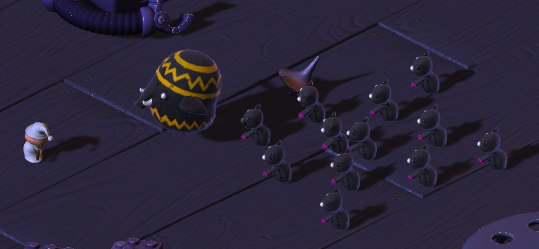
Intro
This tutorial is the continuation of the precedent blog post about the 3rd person shooter and doesn't follow the Unite2014 tutorial.
Extensions
Starting where the Unite2014 tutorial left off, we are going to extend the project by adding to it some new functionality. The idea is to straighten our programming skills by looking at some ground technique of game programming like steering behaviours.
Behaviour State Automata
Finite State Machines (FSM) can be considered as one of the simplest AI model form, and are commonly used in the majority of games. A state machine basically consists of a finite number of states that are connected in a graph by the transitions between them. A game entity starts with an initial state, and then looks out for the events and rules that will trigger a transition to another state. A game entity can only be in exactly one state at any given time, however it doesn’t mean the entity can exhibit only one active behavior at a time, we can see a state as a collection of multiple active behaviours that work together for the entity (like walking and in the meantime looking for the player).
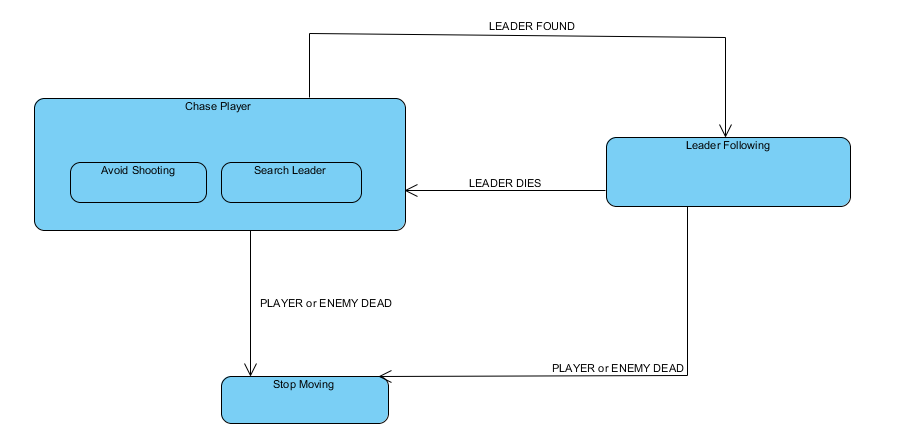
Let’s give a more complex behaviour to our autonomous enemies, there are a lot of ways to make them smarter, what are we gonna do is follow the automata below and implement all the single behaviours.
Chase Player: is a behaviour made of other sub behaviours, basically the entity chases the player while performing:
Leader Following: the enemy gets behind a leader that uses as a cover from player bullets.
Stop Moving: the enemy stops moving when he or the player dies.
This diagram will be the model for our enemy agent, in the next sections we are gonna extend the enemy functionality by adding one after another the different behaviours shown in the diagram, in respect of the transitions for commuting from a behaviour to another.
We aren’t gonna use a framework or extensions for creating the complex behaviour, since the states are few, we can just use some simple conditions clause.
Steering Behaviours
Steering behaviors aim to help autonomous characters move in a realistic manner, by using simple forces that are combined to produce life-like, improvisational navigation around the characters' environment. They are not based on complex strategies involving path planning or global calculations, but instead use local information, such as neighbors' forces. This makes them simple to understand and implement, but still able to produce very complex movement patterns.
Leader Following
The leader following behavior is a composition of other steering forces, all arranged to make a group of characters follow a specific character (the leader). To achieve this we could easily use a seeking behaviour and make the enemy follow the leader with the navigation mesh component, but the result wouldn’t be good enough.
Movement Manager
We want our code to be most flexible and reusable as possible, since the behaviours we are gonna make can be used in our future projects, we would like to implement it in a separate class that will hold all the knowledge.
Still we miss a clear aspect of the entities we want to guide with our Movement Manager, we need an interface.
Create in Script/Interfaces a new c# script called MovementInterfaces.cs
Define your moving entity
public interface IMovingEntity {
Vector3 GetPosition();
Vector3 GetVelocity();
double GetMaxVelocity();
GameObject GetGameObject();
}
3. We’ll now extend our EnemyMovement script to provide such functionalities:
//IMovingEntity
public Vector3 GetPosition(){
return transform.position;
}
public Vector3 GetVelocity(){
return nav.velocity;
}
public double GetMaxVelocity(){
return float.PositiveInfinity;
}
public GameObject GetGameObject(){
return gameObject;
}
4. Finally we’ll create our MovementManager.cs class
public static class MovementManager {
/*
* This static class will be about steering behaviours.
* Collection of functions that return a vector based on some expected behaviour.
*/
}
Following
The first steering behaviour we are gonna write is the following behaviour, in which the entity is attracted to the leader’s back.
First thing we are gonna do is write an utility function to get a point that is behind of a moving entity. A character should try to stay slightly behind the leader during the following process, like an army staying behind its commander. The point to follow (named behind) can be easily calculated based on the target's velocity, since it also represents the character direction.
public static Vector3 GetBehindPosition(IMovingEntity entity, float distance){
Vector3 direction = entity.GetVelocity ();
Vector3 nd = direction.normalized * -1;
return (nd * distance) + entity.GetPosition();
}
Now that we have a way to get this point from a MovingEntity we need a function to get a vector that points in that direction with a given force. This is can be obtained easily by subtracting two point in space.
//vector that points from start to target point
public static Vector3 GetTowardsVector(Vector3 start, Vector3 target){
return (target - start);
}
Now let’s put all together for our public steering behaviour.
public static Vector3 GetFollowLeaderVector(IMovingEntity follower,IMovingEntity leader, float leaderBehindDistance){
//get the point to follow
Vector3 behindp = GetBehindPosition (leader, leaderBehindDistance);
//find the direction vector
return GetTowardsVector (follower.GetPosition (), behindp);
}
Let’s return to our EnemyMovement script and make some changes, so that we can test this out.
First we need to assign to our enemy entity the leader to follow, for now let’s use a public GameObject reference to the leader.
public GameObject leaderReference;
IMovingEntity leader;
EnemyHealth leadeHealt; // we have to know if the leader is alive
void Awake ()
{
player = GameObject.FindGameObjectWithTag ("Player").transform;
playerHealth = player.GetComponent <PlayerHealth> ();
enemyHealth = GetComponent <EnemyHealth> ();
nav = GetComponent <NavMeshAgent> ();
pm = player.GetComponent<PlayerMovement> ();
AssignLeader (leaderReference);
}
void AssignLeader(GameObject l){
leaderReference = l;
leader = leaderReference.GetComponent<EnemyMovement> ();
leaderHealth = leaderReference.GetComponent<EnemyHealth> ();
}
Let’s remember that a steering behaviour is mostly a combination of difference force summed together, we’ll then use a steering vector to move the enemy obtained as the sum of the precalculated behaviours.
//Behaviour state in witch we follow our group leader
void LeaderFollowing(){
//Get the steering force
Vector3 steering = Vector3.zero;
//follow the leader
Vector3 followingForce = MovementManager.GetFollowLeaderVector (this, leader, 1.8f);
steering += followingForce;
//move the player to the pointed direction using navMesh
Vector3 targetPoint = transform.position + steering;
//Debug Rays
Debug.DrawRay (GetPosition (), followingForce, Color.magenta);
Debug.DrawRay (GetPosition (), steering, Color.yellow);
//Move to destination
nav.SetDestination (targetPoint);
}
We’ll still move the player using the navigation mesh since we don’t want to lose the privilege of evading obstacles.
Now we have to call the function LeaderFollowing in the Update() funciton.
void Update ()
{
if(enemyHealth.currentHealth > 0 && playerHealth.currentHealth > 0)
{
if(leaderHealth != null && !leaderHealth.IsDead())
LeaderFollowing();
else{
//Chase the player
nav.SetDestination (player.position);
}
}
else
{
nav.enabled = false;
}
}
Let’s disable the EnemyManager script, place some enemy on screen (the hellophant makes the perfect leader) and test this out (remember to assign the leader reference).
Separation
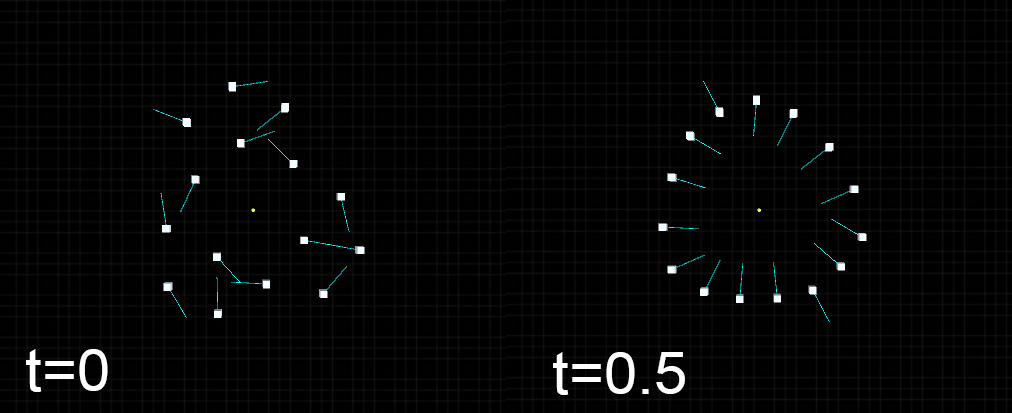
The first thing we notice is that all the enemies try to reach the exact spot and form a “blob”, we want to avoid crowding since it doesn’t feel natural this way. This can be avoided using separation, one of the rules of flocking behaviour.
What we are gonna do is to calculate a separation force obtained by the presence of different close entities, this force help entities to keep a distance from each other.
First, let’s build an utility function that gets the close neighborhood from our entity in a specific range.
public static List<GameObject> FindNeighborhood(Vector3 point, float radius, string findingTag){
GameObject[] gos = GameObject.FindGameObjectsWithTag (findingTag);
List<GameObject> neighbor = new List<GameObject> ();
foreach (GameObject go in gos) {
if((go.transform.position - point).magnitude < radius)
neighbor.Add(go);
}
return neighbor;
}
We can get the length of a vector using magnitude, we then use a specific Tag to identify all the enemies in our scene, just remember to change the enemies prefab tag property from the inspector before testing.
Now getting the separation force is easy! All we need to do is get the sum of distances from the entity to the neighborhood, then we normalize, scale and invert the vector.
public static Vector3 GetSeparationVector(IMovingEntity entity, float maxSeparation, float radius, string separationEntityTag){
Vector3 pos = entity.GetPosition ();
List<GameObject> neighbor = FindNeighborhood (pos, radius, separationEntityTag);
Vector3 force = Vector3.zero;
foreach(GameObject go in neighbor){
force += (go.transform.position - pos);
}
// equipare the force
force /= neighbor.Count;
// scale it
force *= maxSeparation;
//return the inverse
return force * -1;
}
Let’s change EnemyMovement and test this out.
void LeaderFollowing(){
//Get the steering force
Vector3 steering = Vector3.zero;
//follow the leader
Vector3 followingForce = MovementManager.GetFollowLeaderVector (this, leader, 1.8f);
steering += followingForce;
//have a bit of separation
Vector3 separationForce = MovementManager.GetSeparationVector (this, enemySeparation, 2.5f, "Enemy");
steering += separationForce;
steering += evadingForce;
//move the player to the pointed direction using navMesh
Vector3 targetPoint = transform.position + steering;
Debug.DrawRay (GetPosition (), followingForce, Color.magenta);
Debug.DrawRay (GetPosition (), separationForce, Color.white);
Debug.DrawRay (GetPosition (), steering, Color.yellow);
nav.SetDestination (targetPoint);
}
Remember to assign the Enemy tag to your enemies. Play with the enemySeparation parameter to get the desired separation degree.
If it does look like a Michael Jackson video, you are good to go!
Avoidance
Separation seems to give a more natural feel at the movement of our crew, but still you can see that something seems off. When the entities are in front of our leader they shouldn’t block is path, instead they should quickly move away.
To achieve this we are gonna use a similar technique to the seeking one, but instead of reaching a point, we are gonna get away from it. This point will be in front of the player and a force will be given only if the entity is close enough to it.
First thing to do is an utility function to get a point in front of an entity.
public static Vector3 GetFrontPosition(IMovingEntity entity, float distance){
Vector3 direction = entity.GetVelocity ();
Vector3 nd = direction.normalized;
return (nd * distance) + entity.GetPosition();
}
Then we write our behaviour function:
public static Vector3 GetEvadeFrontLeaderVector(IMovingEntity entity, IMovingEntity leader, float evadingPointRadius){
Vector3 force = Vector3.zero;
Vector3 ep = entity.GetPosition ();
Vector3 lfront = GetFrontPosition (leader, evadingPointRadius);
//if the entity stands in the leader way
if ((lfront - ep).magnitude <= evadingPointRadius) {
force = GetOppositeVector(ep, lfront).normalized;
}
return force;
}
To go in the opposite direction of a point we can do:
//vector that point the opposite direction of the evadePoint
public static Vector3 GetOppositeVector(Vector3 start, Vector3 evadePoint){
return GetTowardsVector (start, evadePoint) * -1;
}
Let’s edit the EnemyMovement script to add the new behaviour and test it out.
void LeaderFollowing(){
//Get the steering force
Vector3 steering = Vector3.zero;
//follow the leader
Vector3 followingForce = MovementManager.GetFollowLeaderVector (this, leader, 1.8f);
steering += followingForce;
//have a bit of separation
Vector3 separationForce = MovementManager.GetSeparationVector (this, enemySeparation, 2.5f, "Enemy");
steering += separationForce;
//don't get in the laeder way
Vector3 evadingForce = MovementManager.GetEvadeFrontLeaderVector (this, leader, leaderDistanceFront);
evadingForce *= leaderEvadingFrontForce;
steering += evadingForce;
//move the player to the pointed direction using navMesh
Vector3 targetPoint = transform.position + steering;
Debug.DrawRay (GetPosition (), followingForce, Color.magenta);
Debug.DrawRay (GetPosition (), separationForce, Color.white);
Debug.DrawRay (GetPosition (), evadingForce, Color.red);
Debug.DrawRay (GetPosition (), steering, Color.yellow);
nav.SetDestination (targetPoint);
}
Play with the leaderDistance parameter to get the right result.
Avoiding Player Shooting
Looks like we have everything we need to make this work real fast! All we have to do is apply the avoidance technique to a point in front of the player while our enemy is in the chasing player state.
First thing first, let PlayerMovement implement IMovingEntity, then we just write a better version of the ChasePlayer function.
void ChasePlayer(){
//Chase player
Vector3 steering = Vector3.zero;
//by default go towards the player
steering += MovementManager.GetTowardsVector (transform.position, player.position);
//try to evade being shot
Vector3 evadingForce = Vector3.zero;
if (evadePlayerSight) {
evadingForce = MovementManager.GetEvadeFrontLeaderVector (this, pm, 2.5f) * 5.0f;
steering += evadingForce;
}
nav.SetDestination (transform.position + steering);
Debug.DrawRay (transform.position, steering, Color.gray);
Debug.DrawRay (transform.position, evadingForce, Color.blue);
}
At first inspection the enemies seems to behave correctly, however with a little bit more of testing you can easily notice that something seems off. The enemies sometimes seems to run away from the player and there are moment where the sum of the two forces would be zero and therefore they will not really move, making them a simple target. That’s because enemies are currently avoiding a point, when they really should be avoid a sight.
We then need to add a new function to our MovementManager, one that moves the evader away from an entity sight adding a force that is perpendicular to the sight direction.
First off let’s write a function that given a direction it returns a force that’s perpendicular to that direction.
//(Uses Vector3.up)
//gets the perpendicular vector of a direction in xz with a force
public static Vector3 GetCrossVector(Vector3 direction, float force){
//this is because in the 3d scene there are infinite perpendicular vectors to direction
Vector3 crossv = Vector3.Cross (direction, Vector3.up).normalized;
return crossv * force;
}
Vector3.Cross() returns the cross product of the two vectors, the reason we are using Vector.up is because we are interested in the direction that lays on the xz plane, in the 3d space there are infinite perpendicular lines passing through a single line.
Now let’s write the function to avoid an entity sight, have in mind there are multiple ways of doing this, we could have used a raycast for example, but we are gonna do it in a more geometric fashion way, to have a little bit of more flexibility for the sight range of the entity.
//Move away from the entity sight
public static Vector3 GetAvoidDirectionVector(IMovingEntity entity, IMovingEntity evader, float range, float force){
Vector3 avoidv = Vector3.zero;
Transform entityTransform = entity.GetGameObject ().transform;
Vector3 dirVec = entityTransform.forward.normalized; //the direction the entity is facing
Vector3 crossVec = Vector3.Cross (dirVec, evader.GetPosition () - entity.GetPosition ());
//notice that the direction of crossVec is up or down in the y axis, but it's the distance (magnitute) we are interested in.
float dist = crossVec.magnitude; // distance from the direction vector
//Is it in front of the entity?
Vector3 relativePoint = entityTransform.InverseTransformPoint (evader.GetPosition ());
if (dist < range && relativePoint.z > 0.0f) {
avoidv = GetCrossVector(dirVec, force);
if(relativePoint.x > 0.0f)
avoidv *= -1;
}
//Debug.Log("rp.z: " +relativePoint.x);
return avoidv;
}
We use the cross product to find the shortest distance between the sight direction and the evader position point, it could seem a little bit tricky since the result is a vector that points up or down in the y axis, however the magnitude of the result is exactly what we are looking for.
The simple condition dist < range for triggering the force wouldn’t be enough, since we also need to check if the evader is in front of the player and not behind. The easiest way of checking the position of the evader relative to the entity is to use and inverse transformation of the evader position in respect of the entity position. Basically we are gonna get the position of the evader relative to the entity position, moving the axis (center) of the world to the entity position.
We are moving in the xz plane, so everything that has a relative position.z greater than zero is in front of the player.
Also, the perpendicular force we are adding has a fixed direction, we need to invert the direction somehow, so let’s use the relative x axis.
Test the game, and see how the enemies behave, isn’t it way better than before?
Stochastic Behaviour
If the game becomes too much predictable, it’s no longer fun. A game should always provide a good challenge to the player and sometimes adding a bit of probability is an easy way to deal with boring and repetitive patterns our autonomous entities could fall into. In the same way, having an IA too complex could make the game too hard for the player: magine an enemy bot in an FPS game that can always kill the player with a headshot, an opponent in a racing game that always chooses the best route, and overtakes without collision with any obstacle, etc.
The following are the main situations when we would want to let our AI entities change a random decision:
Non-intentional: This situation is sometimes a game agent, or perhaps an NPC might need to make a decision randomly, just because it doesn't have enough information to make a perfect decision, and/or it doesn't really matter what decision it makes. Simply making a decision randomly and hoping for the best result is the way to go in such a situation.
Intentional: This situation is for perfect AI and stupid AI. As we discussed in the previous examples, we will need to add some randomness purposely, just to make them more realistic, and also to match the difficulty level that the player is comfortable with. Such randomness and probability could be used for things such as hit probabilities, plus or minus random damage on top of base damage. Using randomness and probability we can add a sense of realistic uncertainty to our game and make our AI system somewhat unpredictable.
Searching for the leader
In our project we haven’t still defined the Searching Leader sub behaviour of Chasing Player, what we would like to do is to have the enemy to find and assign the leader autonomously.
The enemy should then be able to distinguish the leader from the common enemies and perceive when one of his kind is near him. This could be easily done by reusing the code of the previous chapter.
Create a new tag called EnemyLeader and assign it to the hellophant prefab
Click apply to save changes to all hellophant instances
Open EnemyMovement script
comment the AssignLeader() call in the awake function
and define our behaviour
void SearchLeader(){
List<GameObject> leaderList = MovementManager.FindNeighborhood (GetPosition (), 8.0f, "EnemyLeader");
if (leaderList.Count > 0) {
//Found a leader, follow him!
AssignLeader(leaderList[0]);
Debug.Log("Assigned leader " + leaderReference.name);
}
}
4. Let’s update the ChasePlayer() function to call SearchLeader
//search for leader
if(leaderReference == null && tag != "EnemyLeader")
SearchLeader();
Let’s hide the hellopant team we used for testing and restore the enemy spawner. What we notice is that every enemy beside the leaders shows the same behaviour, the game should look “smart” and “hard”, however it’s not hard to kill the enemies this way, all you have to do is stay away from the hellophants and kill the enemies behind, or just simply run and kill one team of hellophants at a time.
What can we do to spice up the game now? A little bit of randomness it’s not hard to implement and can give the game that bit of unpredictability every game needs to not look boring in the eyes of the player.
Our enemies should be able to decide themselves if they are gonna start following the leader or simply chase the player. Let’s say they decision is taken at random.
//Has choose to follow the leader or not?
bool choiceMade = false;
public float followingLeaderChance = 30.0f;
void SearchLeader(){
//do nothing if I've already decided
//I stick with my decision
if (choiceMade)
return;
List<GameObject> leaderList = MovementManager.FindNeighborhood (GetPosition (), 8.0f, "EnemyLeader");
if (leaderList.Count > 0) {
//Consider to follow the leader
//Let's say there's a 30% chance
float val = Random.Range(0,100);
if(val <= followingLeaderChance){
AssignLeader(leaderList[0]);
Debug.Log("Assigned leader " + leaderReference.name);
}
choiceMade = true;
}
}
We used the Random.Range function to generate a random number between 0 and 100, then we follow the leader only if this number is lower than the followingLeaderChange public variable. If we decided to follow or not the leader, we stick with this choice, we are gonna stick with this choice.
Let’s test the game, what do you think about it? Does it feel a little bit harder?
Optimization (Optional)
Right now there are dozens of enemy, everyone repeating the same pattern in the update function. Every time an enemy is searching for a leader he is basically using a loop into the game loop only to do a proximity check, and it is done for every enemy in 1/60 of a second. Can we do something to ease this enemy functionality so that it is done only once in a while? We could use coroutines!
Coroutines
A coroutine is like a function that has the ability to pause execution and return control to Unity but then to continue where it left off on the following frame. It is essentially a function declared with a return type of IEnumerator and with the yield return statement included somewhere in the body. The yield return line is the point at which execution will pause and be resumed the following frame. To set a coroutine running, you need to use the StartCoroutine function.
This can be used as a way to spread an effect over a period time but it is also a useful optimization. Many tasks in a game need to be carried out periodically and the most obvious way to do this is to include them in the Update function. However, this function will typically be called many times per second. When a task doesn’t need to be repeated quite so frequently, you can put it in a coroutine to get an update regularly but not every single frame.
We write our code as follow:
private bool coroutineStarted = false;
IEnumerator SearchLeader(){
while (true) {
//do nothing if I've already decided
//I stick with my decision
//if (choiceMade)
// return;
Debug.Log("Searching..");
List<GameObject> leaderList = MovementManager.FindNeighborhood (GetPosition (), 8.0f, "EnemyLeader");
if (leaderList.Count > 0) {
//Consider to follow the leader
//Let's say there's a 30% chance
float val = Random.Range (0, 100);
if (val <= followingLeaderChance) {
AssignLeader (leaderList [0]);
Debug.Log ("Assigned leader " + leaderReference.name);
}
//choiceMade = true;
StopCoroutine("SearchLeader");
}
yield return new WaitForSeconds(1.2f);
}
}
To be invoked the method must return an IEnumerator. We start our coroutine when needed and only once as follow:
if (!coroutineStarted) {
coroutineStarted = true;
StartCoroutine ("SearchLeader");
}
References